
Contact Book
Manage verified individuals and businesses you send funds to or request payments from - all with built-in compliance and AML checks.
The Contact Book in Damisa Portal is used to manage individuals or businesses you intend to request money from or send money to. It serves not only as a convenience layer for recurring transactions but also as a key part of our compliance and anti-money laundering (AML) safeguards.
When a new contact is added, it enters a Pending Verification status. At this point, Damisa automatically triggers a light KYC process via our partner SumSub, checking the submitted details against relevant watchlists and databases. This helps ensure that all counterparties meet our compliance standards and helps mitigate the risk of money laundering or fraud.
This verification step is also part of our efforts to align with evolving regulatory frameworks such as MiCA (Markets in Crypto-Assets Regulation), which require stricter oversight on counterparties in crypto-related transactions.
Once a contact is successfully verified, it transitions to Verified status and can then be used in both payment requests and outgoing transfers.
Contacts that remain in Pending Verification status cannot be used until verification is complete.

To add a new contact, simply navigate to the Contact Book section and select “Add New Contact.” The system supports both individuals and business entities, and the form dynamically adjusts based on the selected type.
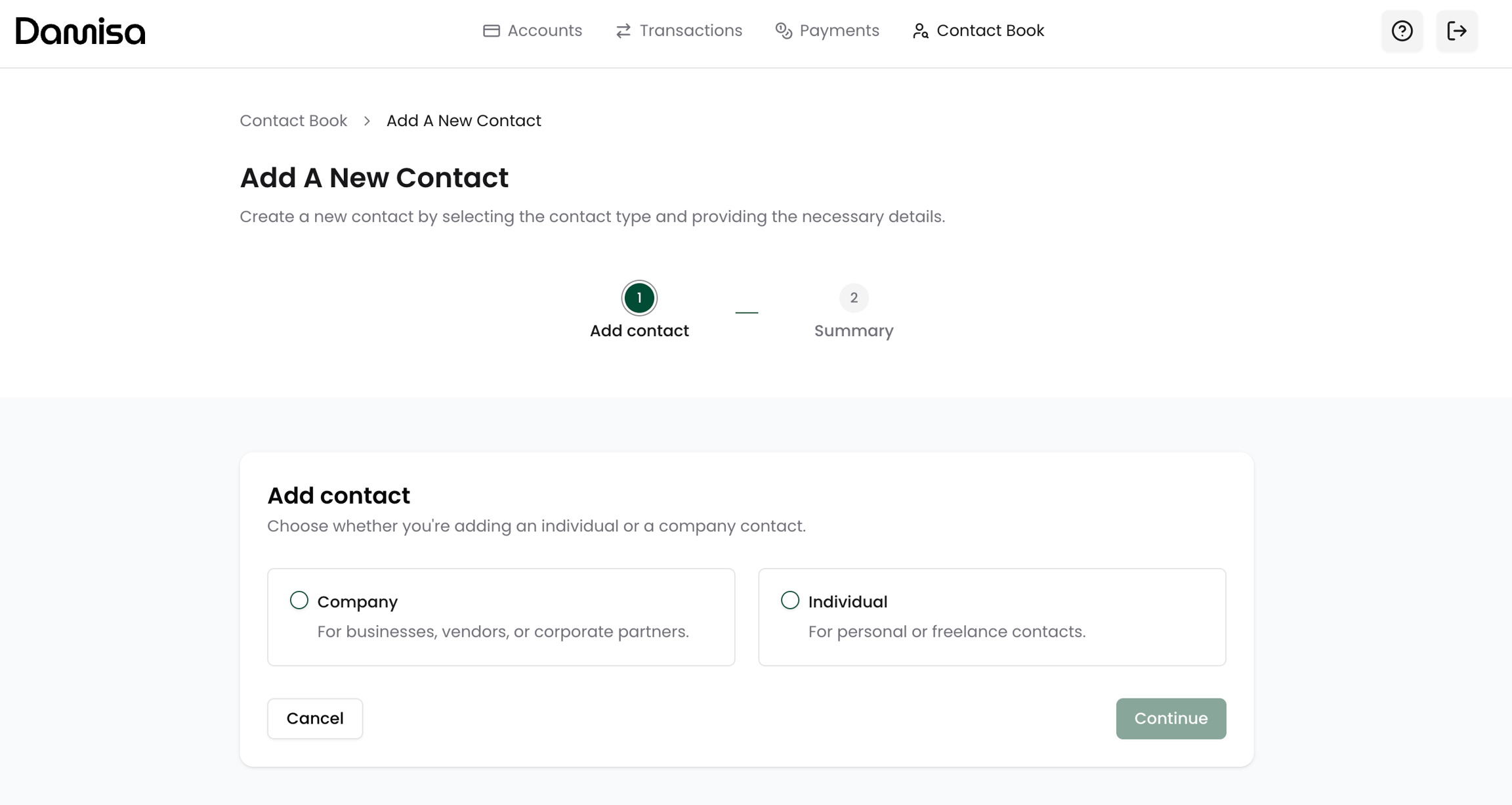
During the creation process, you will be asked to provide key information related to type of contact you wish to add.
Company:
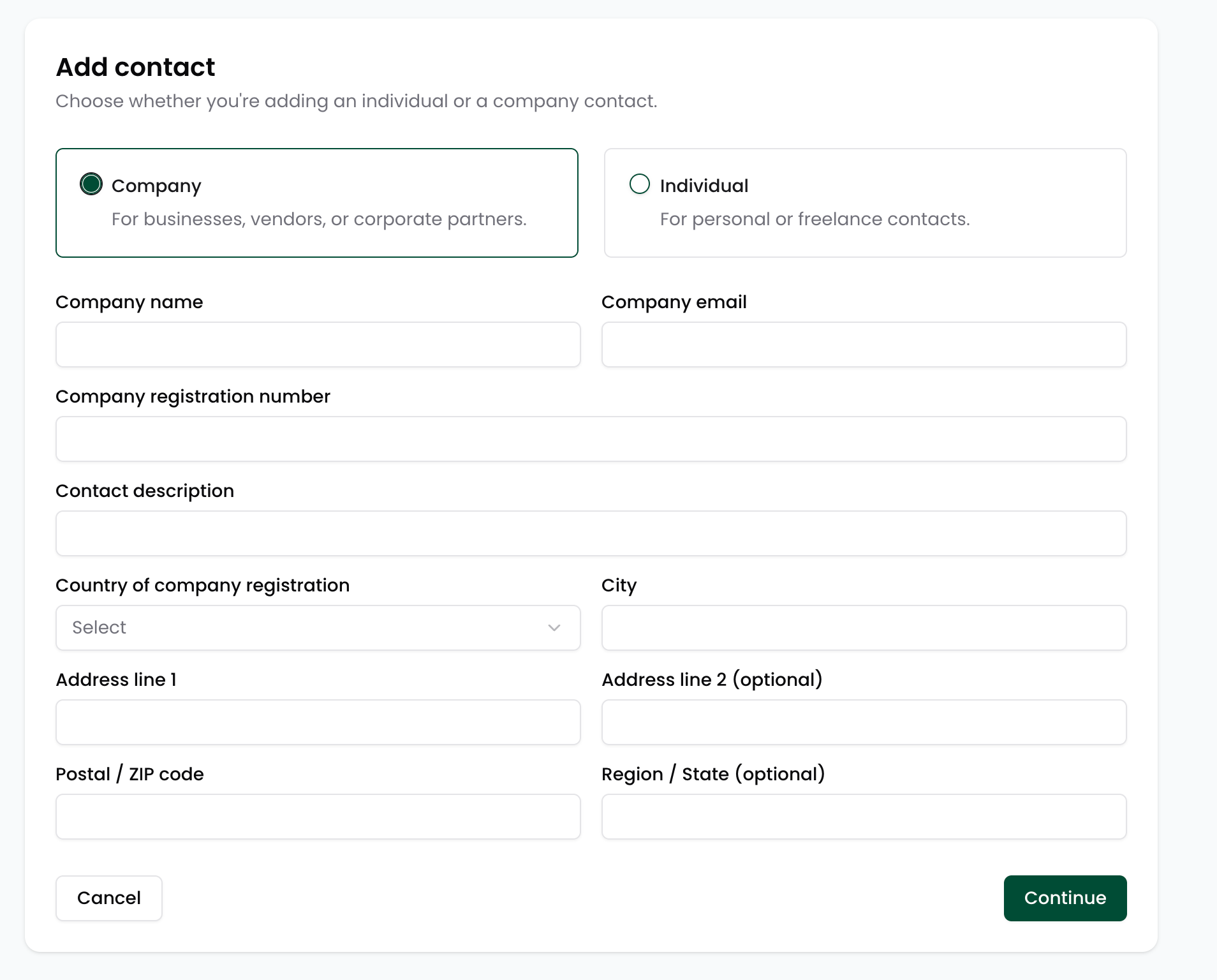
Individual:
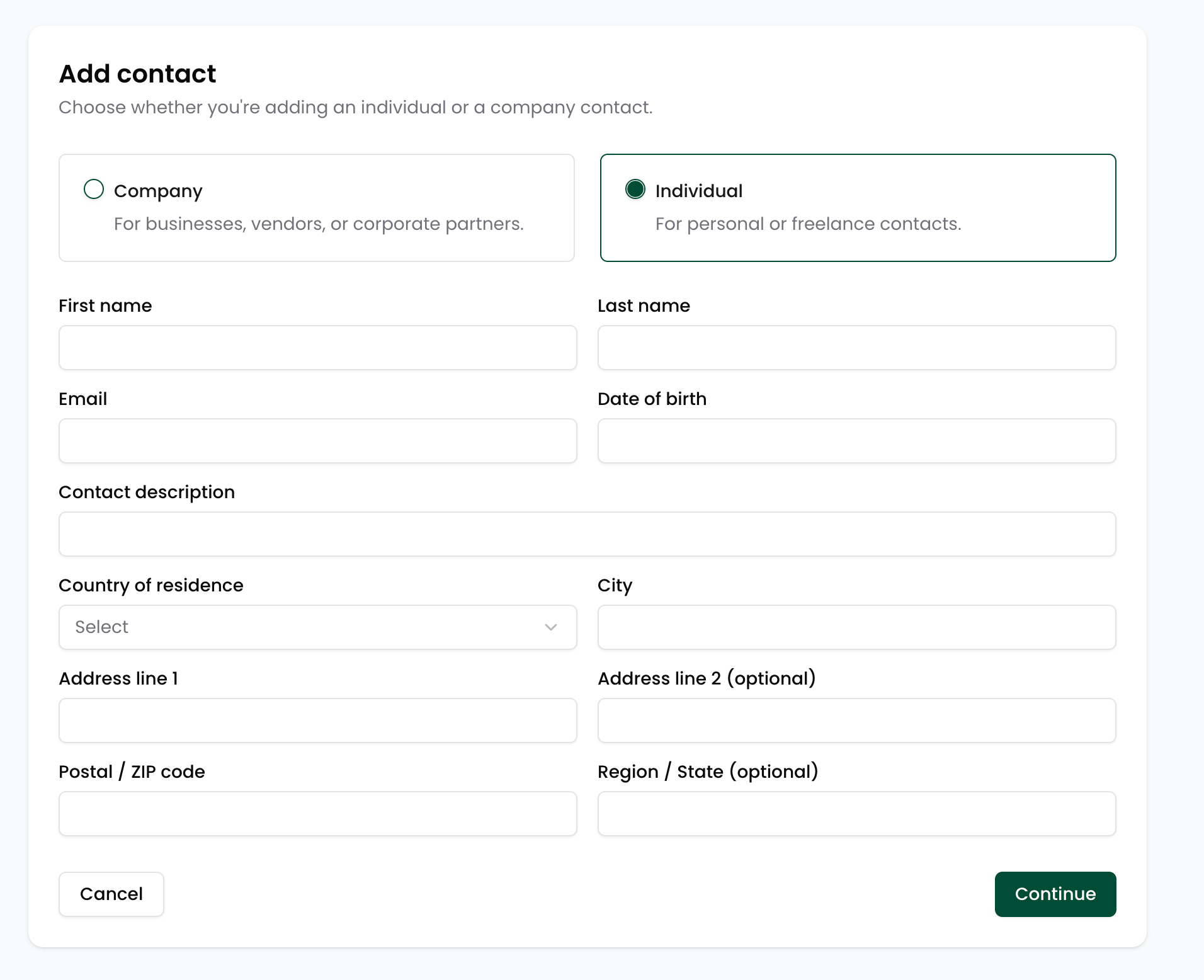
Once submitted, system will ask you to review the details.

Once the contact is created, it will be saved with a Pending Verification status and will be automatically processed through Damisa’s compliance pipeline.
Only the contact’s name and email address are required during creation.
Once submitted, Damisa will automatically send a secure SumSub verification link to the provided email to initiate a light-KYC check. The contact must complete this step before you can create a payment request or send a payment to them.
You will see the contact listed in your book, but it will be clearly marked as pending and unavailable for any transaction flows until verified. If additional information is required or verification fails, users will be notified accordingly with next steps.

This streamlined process ensures that all counterparties are screened and validated before they can participate in any payment activity.
Damisa helps your business stay compliant and protected from regulatory risks, fraud, and unnecessary operational overhead.
Fees for KYC/KYB Checks on Contacts
As part of maintaining a secure and compliant payment environment, Damisa performs KYC/KYB checks on all newly added Contacts. These checks are conducted via trusted verification partners and are designed to:
Ensure compliance with regulations such as AML, Travel Rule, and MiCA,
Reduce the risk of fraud and exposure to sanctioned or high-risk entities,
Provide you with confidence when transacting with third parties through the Damisa platform.
These checks might be billable, depending on your agreement and billing setup.
No charges are deducted from your account automatically - all applicable fees are collected via monthly invoicing, as outlined in your contractual terms.
Adding an Account to Contact
To initiate an outgoing transfer to an external party, it’s not enough to add the contact alone - you must also define at least one account where the funds will be sent. This ensures that Damisa has the correct destination details for executing the transfer, while maintaining compliance and operational traceability.
Contact's accounts are only required when you intend to initiate outgoing transfer from your Damisa Account to a 3rd party contact.
This applies to external payees, if you wish to make a settlement to your own account, use the External Accounts functionality.
To send funds to an external party, simply navigate to the Contact Book, and click on the contact's name you wish to initiate outgoing transfer to, top open new page with its details and select “Add an account.”

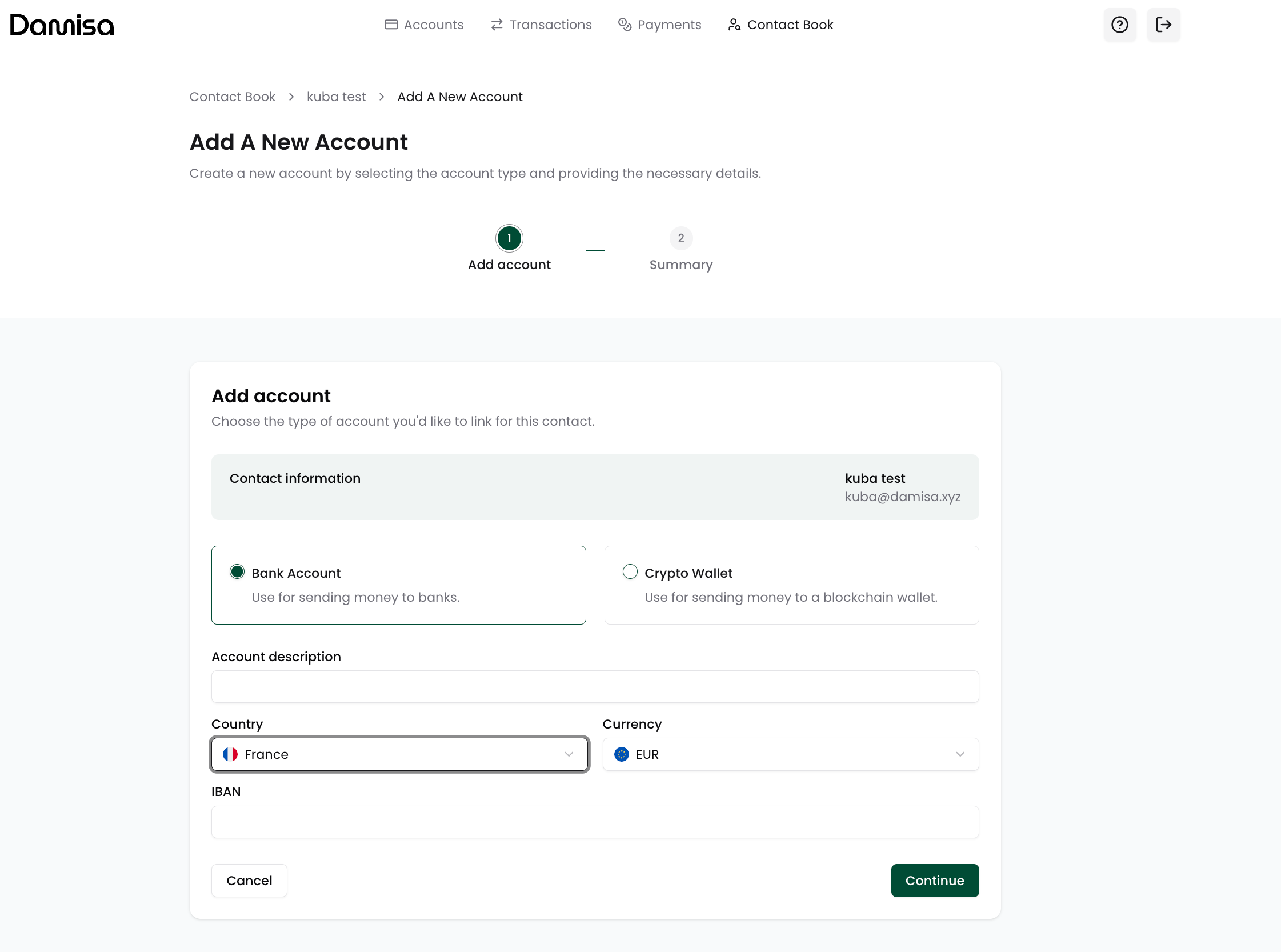
The system supports both crypto wallets and fiat accounts. The form dynamically adjusts based on the account type selected. During the account creation process, you will be asked to provide key information based on the payout method.
Crypto Account
Damisa automatically provides a list of supported blockchains, currencies, and networks. You’ll be prompted to select the relevant combination (e.g., USDC on Ethereum) and enter the wallet address.
⚠️ Important: Make sure you select the correct blockchain and asset that matches the wallet address you provide.
Sending funds to an incompatible address (e.g., USDC on Tron to an Ethereum wallet) may result in permanent loss of funds and recovery might not be possible.
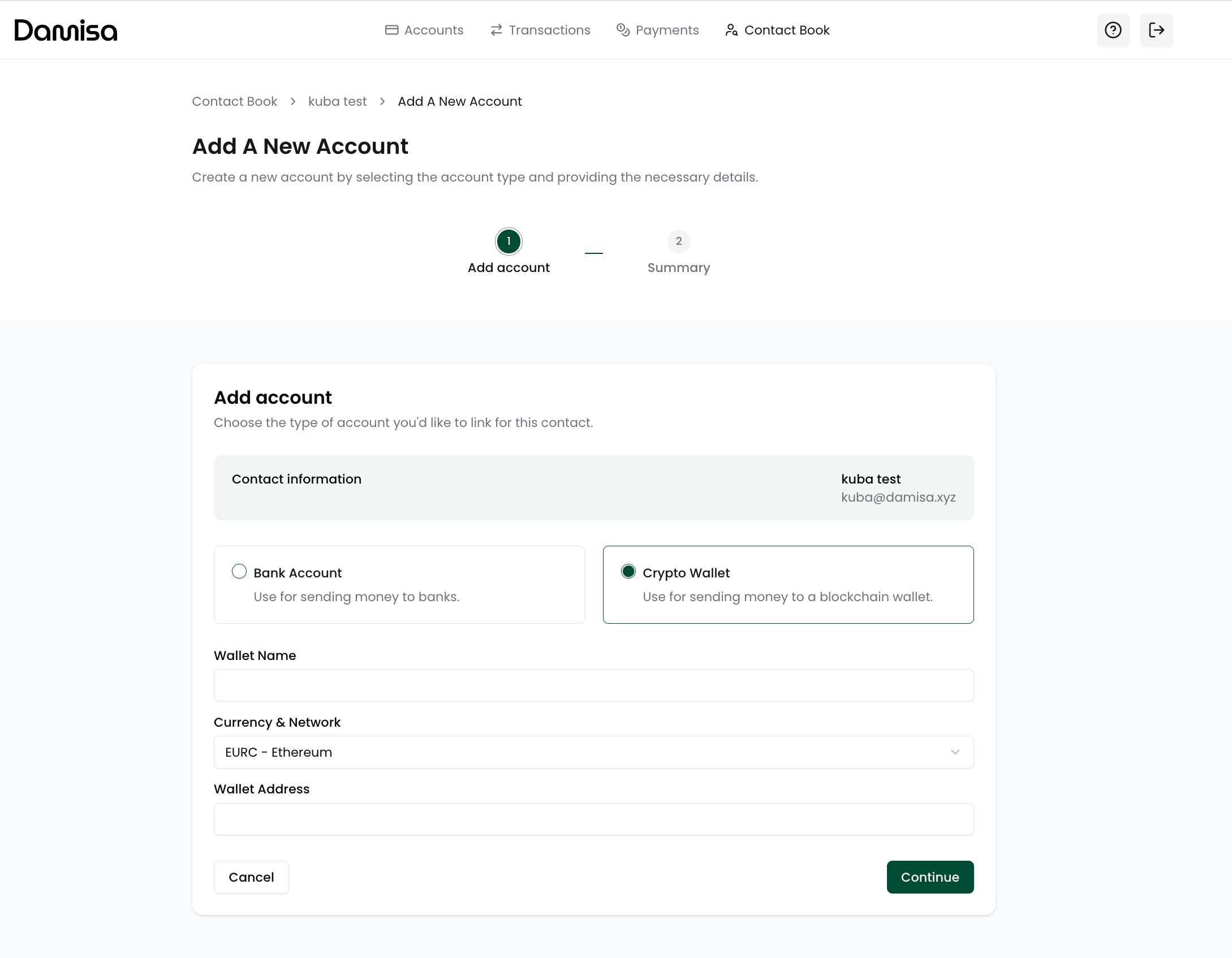
Damisa continuously expands support for new blockchains, assets, and networks.
If you need to send funds over a network or asset not currently listed, please contact your Account Manager to request enablement.
Fiat Account
Damisa dynamically fetches and displays the supported countries and currencies.
You will then be shown with required bank account details depending on your selection to ensure the fastest and cheapest bank transfer to the destination account. For example, you may be asked for an IBAN for EUR or for sort code and account number for GBP - all depending on the payout corridor.
Once submitted, the system will display a summary screen showing the account details. To confirm and finalize the setup, Damisa will send a 6-digit verification code to your registered email address.
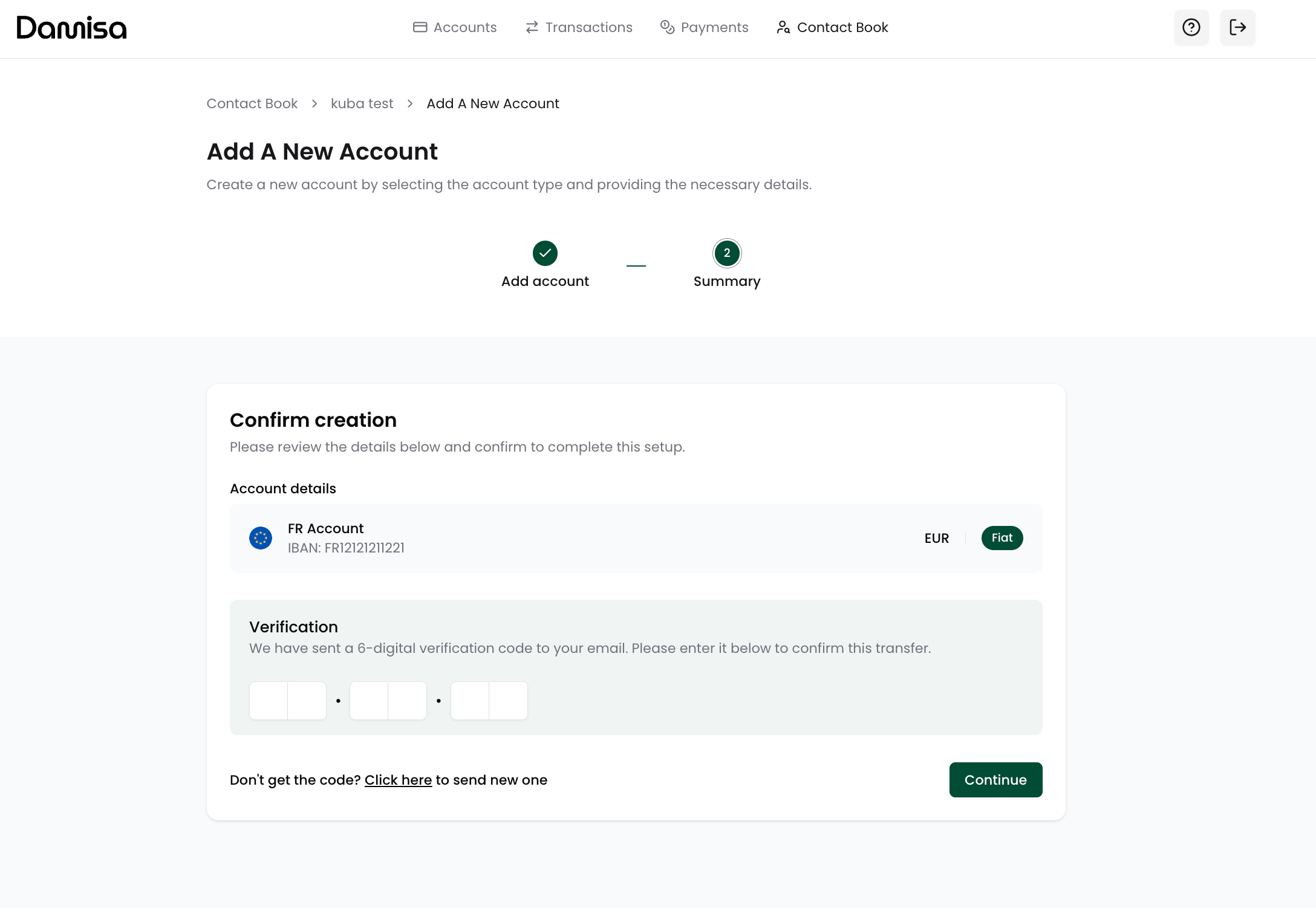
The account will then appear on the contact details screen and will be visible on the selection list whenever you choose given contact to initiate outgoing transfer.

Last updated