
Sending Money Out
Learn how to initiate secure, compliant payouts and settlements from your Damisa Accounts - whether to your own external accounts or to third-party contacts.
Creating an Outgoing Payment (Send Flow)
The Send Flow in Damisa allows your organization to initiate outgoing payments directly from your Damisa Accounts.
There are two types of outgoing payments:
Settlement (to Myself) – moving funds to your own external account or wallet.
Payout (to a Third Party) – sending funds to a verified contact’s account or wallet.
Both flows are designed to provide full control, compliance, and traceability for your treasury operations.
How to start an outgoing payment in Damisa:
From Your Damisa Account:
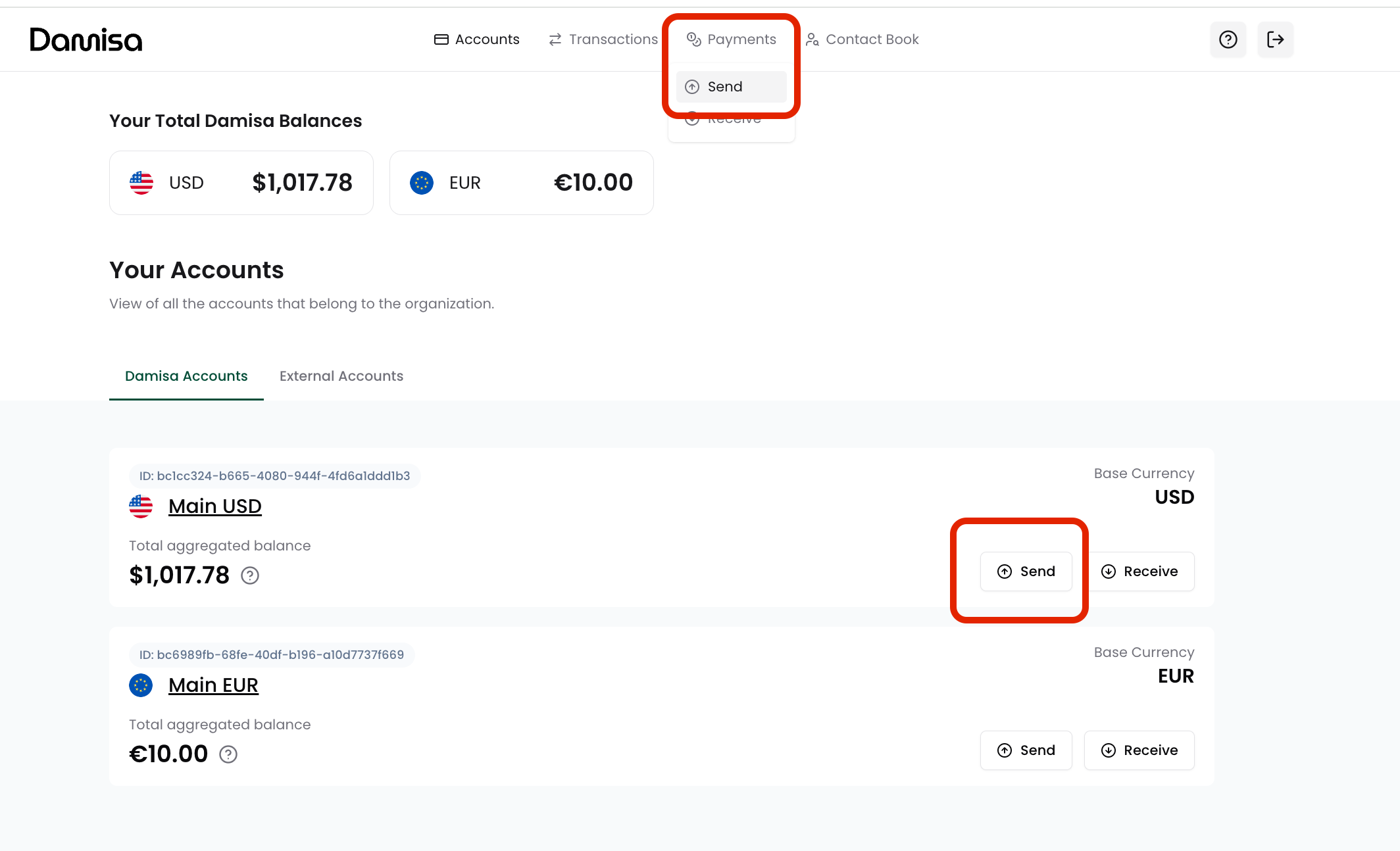
Navigate to the Accounts section.
Click on the specific Damisa Account you wish to send funds from.
Click the “Send” button.
From the Top Navigation Bar:
Go to the Payments tab in the top menu.
Click “Send” to start an outgoing transfer creation flow.
Choosing the Receiver
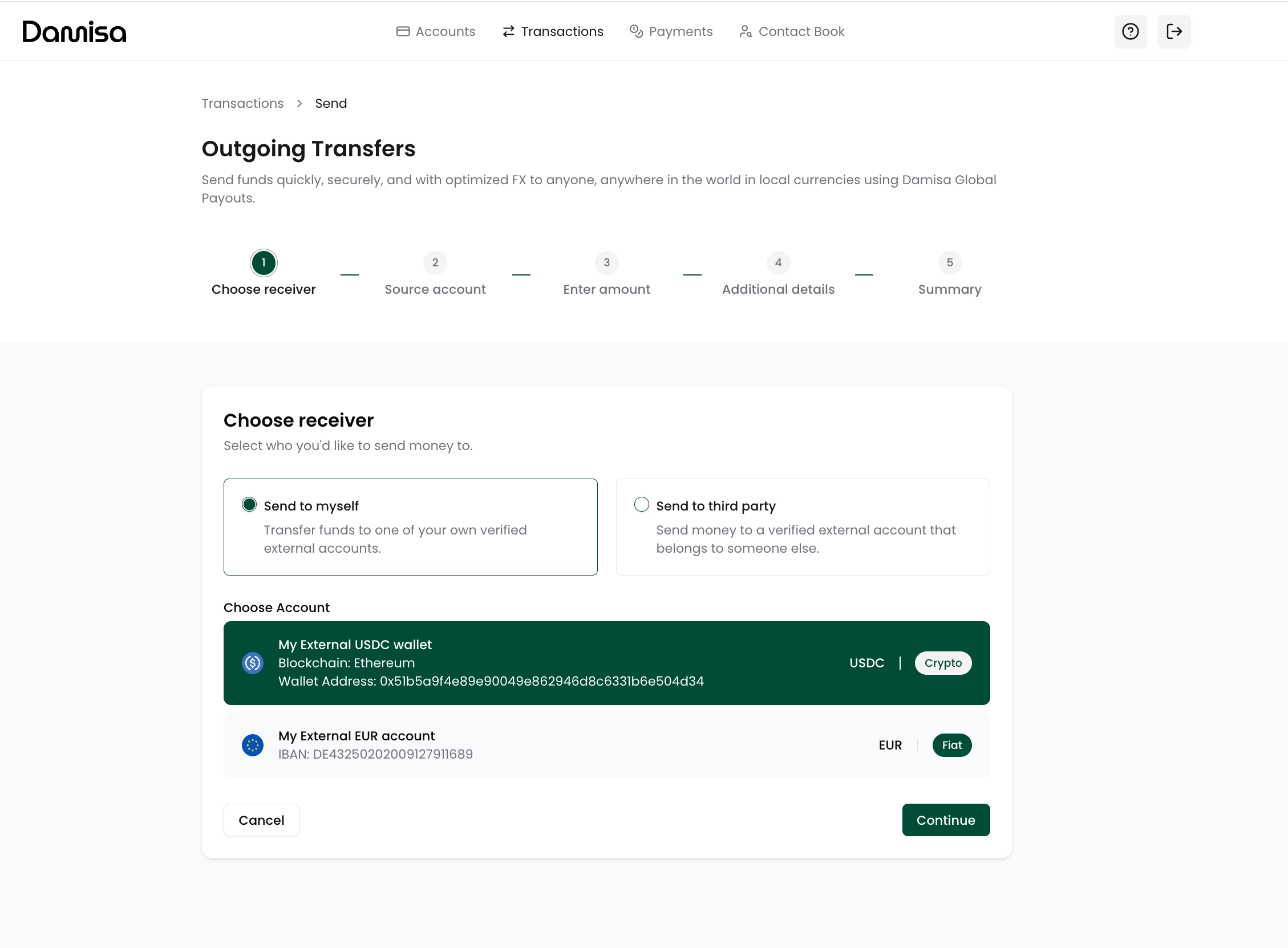
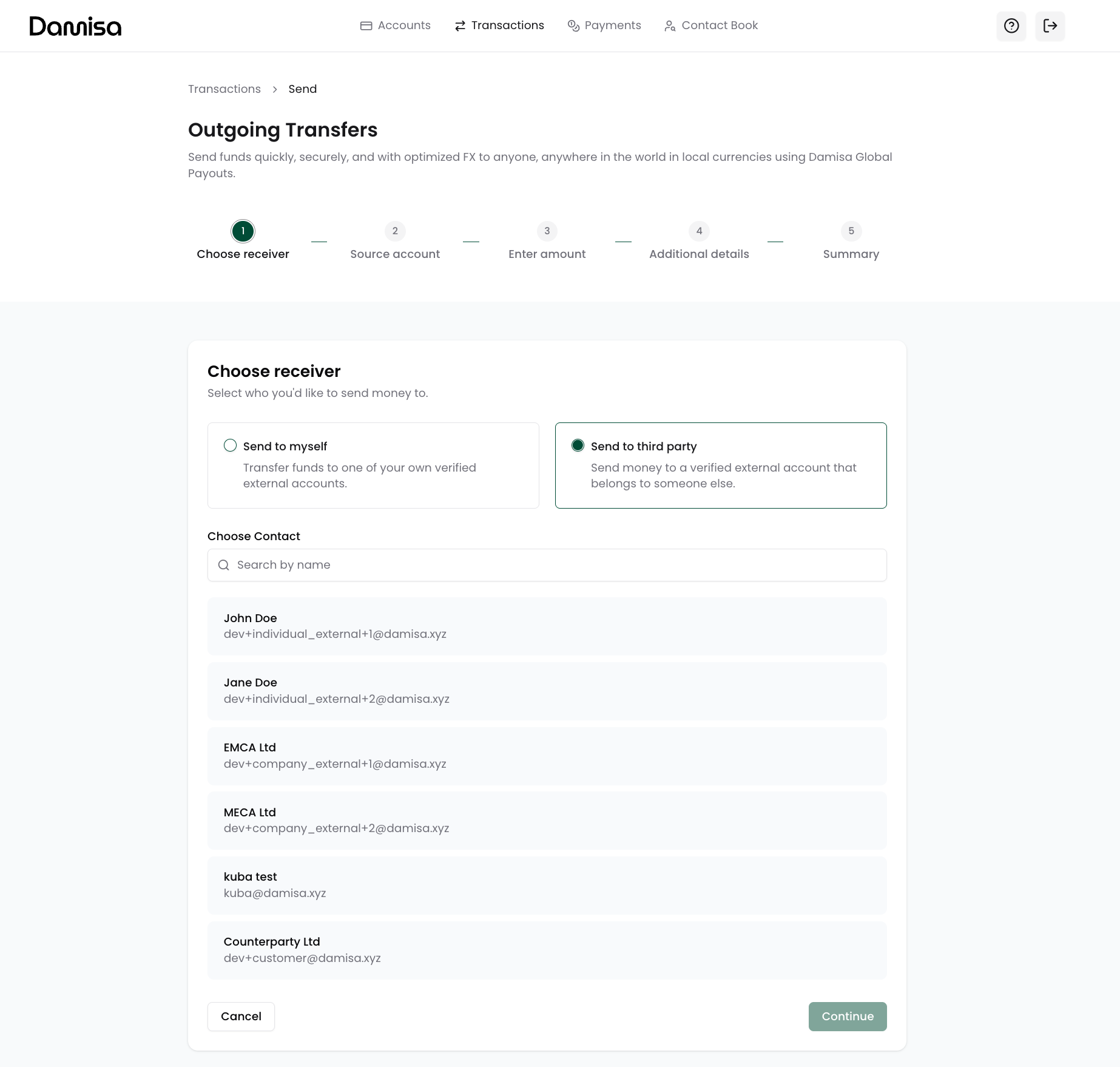
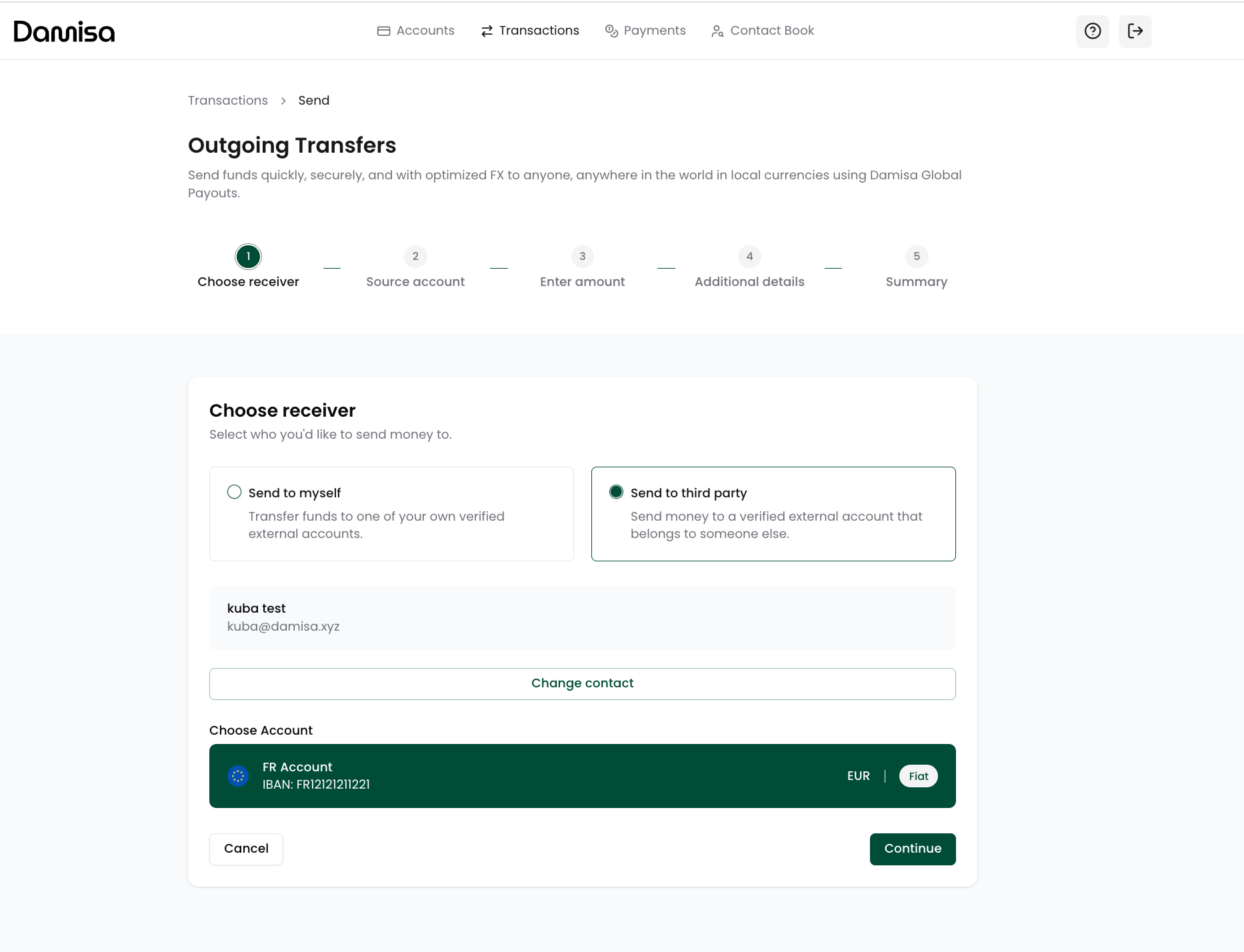
Once you start the Send Flow, the first step is to choose where you would like to send the funds.
You will have two options:
Send to myself (Settlement) - transfer funds to one of your own verified External Accounts held with other financial institutions:
Send to third party (Payout) - send funds to a verified contact’s external account or wallet. The contact must already exist in your Contact Book with a verified status and have a verified payment method linked:
Selecting the Source Account
Next, you will choose which Damisa Account to send funds from.
What you see on this screen
You will see a list of:
All available asset balances (e.g., USDC, USDT),
Across all supported blockchains (e.g., Ethereum, Tron),
Including the exact available balance for each.
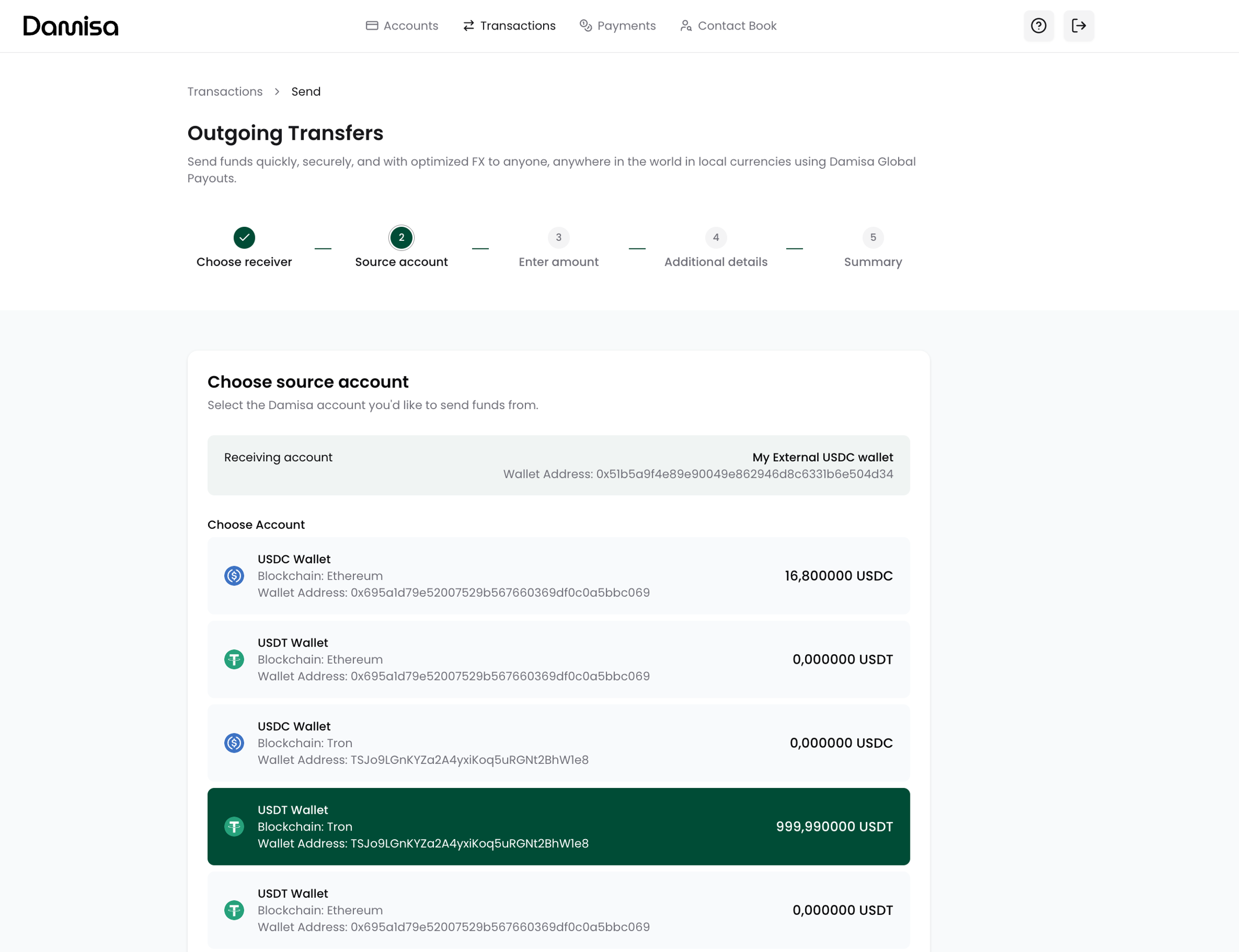
What you see here are not the high-level Damisa Accounts from the Accounts list, but the detailed breakdown of balances per asset and per network visible in the Account Details view.
Since Damisa Accounts can hold multiple stablecoin balances across different blockchains, you currently need to select the exact asset and blockchain combination you wish to use for your outgoing transfer.
Damisa is actively working to enable single outgoing transfers with automatic consolidation across all your balances within a Damisa Account, simplifying your treasury operations.
If your organization needs to send an amount that requires consolidating balances from multiple wallets or blockchains, or if the current approach creates operational friction please contact Damisa Support and the team will assist in manual consolidation or alternative workflow support as needed.
Currency conversion flexibility
Selecting a specific asset and blockchain does not restrict you from sending in a different currency to your external recipient:
Damisa will automatically apply conversion to the destination currency as needed,
For example, you can send funds from your USDC (USD) wallet to an external EUR account, with Damisa handling FX conversion at the moment of transfer.
This ensures your treasury operations remain flexible while maintaining clear asset selection for transparency and compliance.
Entering the Amount
At this stage, you will specify how much you wish to send or how much the recipient should receive.
How it works
The destination currency is automatically determined based on the receiver’s account selected in the first step.
You can:
Enter the amount you wish to send (in your source asset), or
Enter the exact amount the recipient should receive (in their currency).
Damisa will automatically calculate the corresponding value based on live FX rates, displaying an indicative exchange rate immediately for reference (not locked yet). The final rate and any applicable fees will be shown and locked for 15 minutes in the next step (Summary) for your confirmation.

If your agreement includes a Damisa Fee for outgoing transfers:
Fee will not be deducted automatically from your account balance.
Instead, fee will be billed and invoiced to your organization separately, aligned with your agreement and billing terms.
Providing Additional Details
Before confirming your transfer, you might be asked to provide some additional details, depending on the rails and local requirements:
Payment Reference (mandatory) - a reference that Damisa will attempt to pass to the receiving bank or payout partner so the recipient may see it on their statement.
Most local bank transfers honor this reference (though not guaranteed). Crypto networks typically do not display this reference to the recipient.
Payment Description (optional) - an internal memo visible only within your Damisa Portal for your operational and reconciliation purposes. This note will appear in your Transaction Details for your future reference.

Reviewing & Confirming
This is the final step, where you review all details before sending.
Damisa locks the exchange rate for 15 minutes, showing:
Exact amount you are sending,
Expected amount the recipient will receive.
The final received amount may differ if the recipient’s bank or wallet provider charges incoming transfer fees.
While confirming the transfer, you might be asked to enter the 6-digit verification code sent to your registered email.

What happens after confirmation?
Your outgoing transfer will immediately appear in Transaction History with “Processing” status.
Damisa will start initiation of the payout, running final compliance checks and settlement through our partners and networks.
Once the transfer is sent from Damisa, the transaction status will update to “Completed,” and your Damisa Account balance will reflect the deduction.
In rare cases (e.g., bank rejects due to account closure), the transaction may return even after being sent successfully.
Damisa will notify you and work with you to resolve the issue if this occurs. This is a standard occurrence across financial institutions and payout systems.
Last updated